Stat. of Comp. Income (FY)

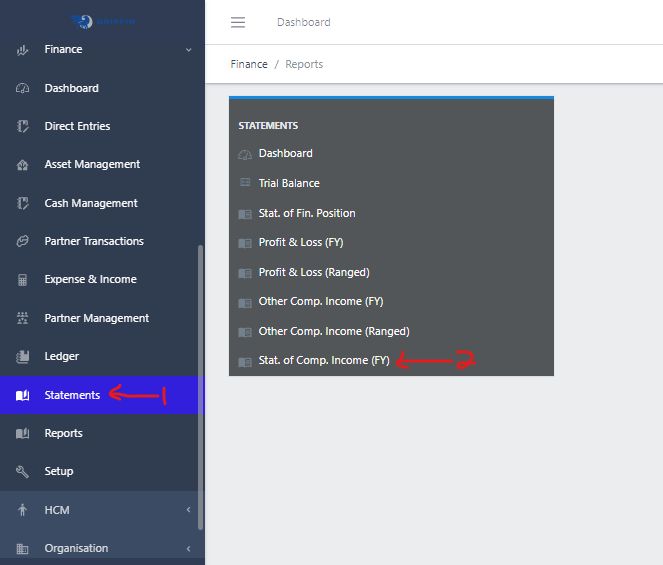
  • Step 1: Access the Statements sub-module of the Finance module from the left sidemenu as shown in the fig1 below.
  • Step 2: Click on Stat. of Comp. Income(FY) as shown in the fig1 below.
Image showing Navigation to Stat. of Comp. Income(FY)
Fig 1.0 Navigation to Stat. of Comp. Income(FY).

  • This displays a list view of Stat. of Comp. Income(FY).
Image showing list view of Stat. of Comp. Income(FY)
Fig 1.1 List view of Stat. of Comp. Income(FY)

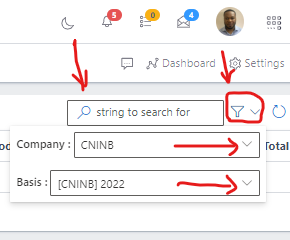
Filter list of Stat. of Comp. Income(FY)

  • Use the Filter button, when clicked, gives you a dropdown where you can specify various parameters for filtering the records:
    • Company: A dropdown list of companies
    • Basis: A dropdpwn list of basis
Image showing Search, filter button and filter options
Fig 2.0 Image showing Search, filter button and filter options

Exporting Stat. of Comp. Income(FY)

  • Export the Stat. of Comp. Income(FY) data to excel by clicking the Export button
Image showing Stat. of Comp. Income(FY) export button
Fig 3.0 Image showing Stat. of Comp. Income(FY) export button.

Note: Once the export button is clicked, it pops up an option to download a copy of the Stat. of Comp. Income(FY) to your computer system as an excel document.

Printing Stat. of Comp. Income(FY)

  • Print the Stat. of Comp. Income(FY) data by clicking the Print button.
Image showing Stat. of Comp. Income(FY) export button
Fig 4.0 Image showing Stat. of Comp. Income(FY) print button.